
Introduction
In the fast-paced realm of IT service management, maintaining flawless application performance is essential. Frequent updates and customisations can make manual testing a time-consuming challenge. That’s where ServiceNow’s Automated Test Framework (ATF) comes in, revolutionizing the testing process by automating and simplifying it.
What is ServiceNow ATF?
The Automated Test Framework (ATF) is a tool within ServiceNow that allows users to automate the testing of applications, forms, UI actions, and workflows. By leveraging ATF, teams can reduce the manual testing effort while improving accuracy, coverage, and overall efficiency.
Key Features of ATF
1. Automated Testing : ATF automates repetitive and complex tests, reducing the need for human intervention.
2. Regression Testing : ATF helps you validate that new updates don’t break existing functionality.
3. Data-Driven Testing : You can create reusable test data sets to run tests across different scenarios.
Why Use ServiceNow ATF?
1. Reduce Risk with Updates and Upgrades
ServiceNow updates can disrupt customizations or cause unexpected issues. ATF automates tests to identify problems early, ensuring everything functions correctly after an upgrade.
2. Save Time and Resources
Manual testing is time-consuming, prone to human error, and requires considerable resources. By automating repetitive tests, ATF allows teams to focus on more critical areas and strategic initiatives.
3. Ensure Consistency
Automated tests are consistent—they perform the same steps in the same way every time. This eliminates variability introduced by human testers, ensuring that results are reliable and repeatable.
4. Facilitate Continuous Integration/Continuous Deployment (CI/CD)
Integrate ATF with CI/CD pipelines to facilitate continuous testing and deployment, ensuring robust application performance.
Steps to create ServiceNow ATF
Step 1: Enable the Automated Test Framework
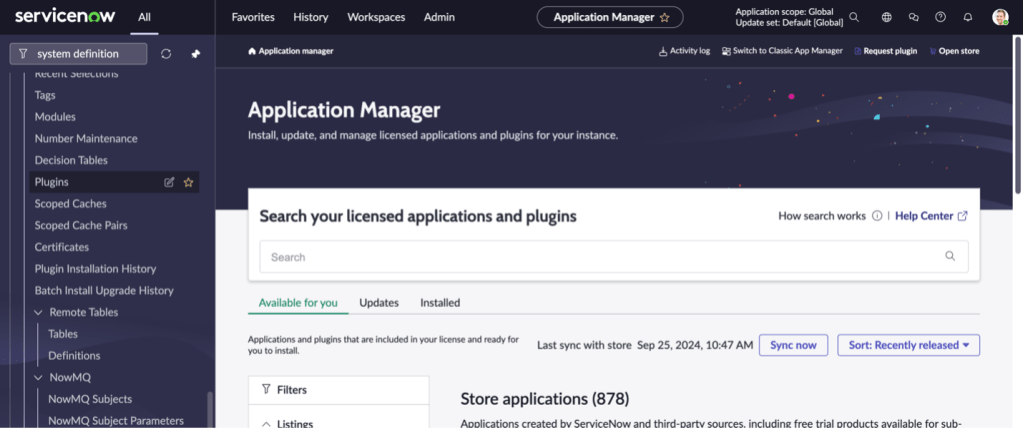
To get started, the ATF plugin needs to be enabled on your ServiceNow instance. You can do this by navigating to **System Definition > Plugins** and searching for **Automated Test Framework**.
Step 2: create Test Suite
For Creating Test Suite follow the below steps –
- Filter Navigator > Automation Framework > Suites
- Click on Suites
- Click on New button
- Fill all the mandatory details and save or submit the form.

Step 3: Create Test Record
For Creating Test follow the below steps –
- Filter Navigator > Automation Framework > Tests
- Click on Tests
- Click on New button
- Fill all the mandatory details and save or submit the form.

Step 4: Add Test Steps
Test steps are individual actions that simulate user interactions or system processes. These can include:
– Form interactions: Open a form, fill in fields, submit forms.
– UI actions : Click buttons, links, or execute specific UI scripts.
– Record validation : Ensure records are created, updated, or deleted as expected.
– Server-side steps : Validate workflows, business rules, and data transforms.

Step 5: Run Tests
You can run tests directly from the test case by clicking **Run Test** or create a **Test Suite** to bundle multiple tests. ATF allows you to run tests in multiple browsers or instances to ensure compatibility across environments.
Step 6: Review Test Results
After the test execution, ATF provides detailed results, including:
– Pass/Fail status : Whether the test succeeded or failed.
– Execution logs : Step-by-step logs for debugging.
– Screenshots : For UI tests, you can capture screenshots to visually verify what occurred during the test.
Step 7: Debug and Rerun Tests
In case of failure, ATF provides insights that help you debug issues quickly. Once fixed, tests can be rerun to ensure the problem is resolved.
Best Practices for ServiceNow ATF
1. Modularise Tests : Break complex test cases into smaller, reusable modules. This will allow you to reuse test steps across multiple test cases, reducing duplication of effort.
2. Use Test Suites : Group related test cases into test suites for organised testing. This also makes it easier to manage large test efforts.
3. Leverage Data-Driven Testing : When testing different input conditions, leverage test data records to ensure all possible combinations are covered.
4. Automate Regression Tests : Regularly run regression tests to ensure that new updates do not break existing functionalities.
5. Integrate with CI/CD : Make ATF a core part of your CI/CD pipeline by automating test execution with each new build or deployment.
You can refer ServiceNow Documentation for detailed idea – Click Me 🙂

 SnowTechStack
Leave a comment